Showing posts with label Excel. Show all posts

Tuesday, March 24, 2020

How to generate a list of unique entries from an Excel column

Hi,

Do you have an excel column filled with bunch of stuff and you want to have a unique list of items in there. You are in the right place :-)

  1. Select the column letter, copy and paste to another location (new sheet or just somewhere else)
  2. Go to Data | Filter | Advanced Filter. Default, Excel will suggest filtering the list "in-place." We prefer copying the unique records to another location, so we can compare the two lists.
  3. Choose "Copy To Another Location", check the box for "Unique Records Only"  and write B1 in the Copy To editor box.
    How to generate a list of unique entries from an Excel column
  4. Press OK, and Hallelujah ... there you go

Result


Tuesday, March 22, 2016

Shortcut to insert new row in Excel

If you press Alt + I + R, you would simply get a new row inserted right away in your Excel sheet :-)

Monday, October 21, 2013

Concat two text cell in Excel

To concat two text cell in MS Excel, use CONCATENATE command.

E.g. =CONCATENATE("i";A1) -> would concat "i" to the begnning of your text at A1 cell.

Wednesday, October 16, 2013

Checks two cell text in Excel

This command, checks the A1 text with A2 text and writes TRUE or FALSE in C1. True is written in case of equality.

C1: =EXACT(A1,B1)

Monday, October 14, 2013

Removing letters from beginning / end of a cell in Excel

LEFT and RIGHT function allow you to remove the certain characters from the beginning or end of one or several. The example below removes the first 4 character from the beginning of A1 cell.

B1: =RIGHT(A1, LEN(A1)-4)

This removes 4 character from the end of the text in A1 cell.

C1: =LEFT(A1, LEN(A1)-4)

Wednesday, January 11, 2012

Having two Excel 2010 files beside each other in Windows 7


Wanna have two Excel files beside each other and you can't get it done !!! Well remember you are using Microsoft products, so don't be surprised that they don't manage normally to let you have two windows beside each other. Well but there is a hard way to do this : 
  1. Open the first workbook any way you want. 
  2. Start a second instance of excel. either double click on shortcut to excel.exe on your desktop or through windows start button | run, then type: excel and hit enter. Then file|open the second workbook. 
  3. Now files are separated and you can have them beside each other ... Siiiiiigggggghhhhhhh :-S

Monday, October 17, 2011

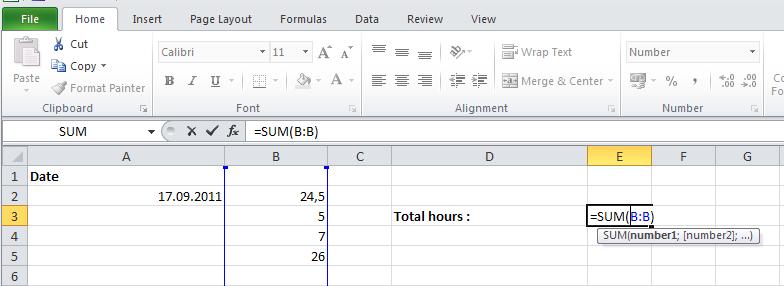
Adding up all values in a column in Excel

To add up all the values from one Excel column in one cell, we only need to do this :


  • click on the cell
  • Write =SUM(COLUMN:COLUMN)
E.g. in following example it is =SUM(B:B), because my numbers are in column B.