Go to your Facebook account, Go to Events, Click on Export Events -> You would get a link
Then go to your Google Calender -> Setting -> Calender Setting -> Calenders -> import calender link in the middle of the page. There you can use the Link you received from Facebook to import the events to your Google calender.
Showing posts with label Google. Show all posts
Showing posts with label Google. Show all posts
Friday, January 14, 2011


Thursday, October 21, 2010
Can't find equal sign on Android keyboard
Nope, you are not blind. They managed to hide it on the 3rd page of your keyboard !!! Press the "?123"(12# in some keyboards) Symbol on the bottom Left(right in some local keyboards). Then Press "ALT"(my Norwegian local keyboard ALT button was "1/2") on the Left-hand side to bring up a new variety of symbols including the equal sign.
Monday, October 11, 2010
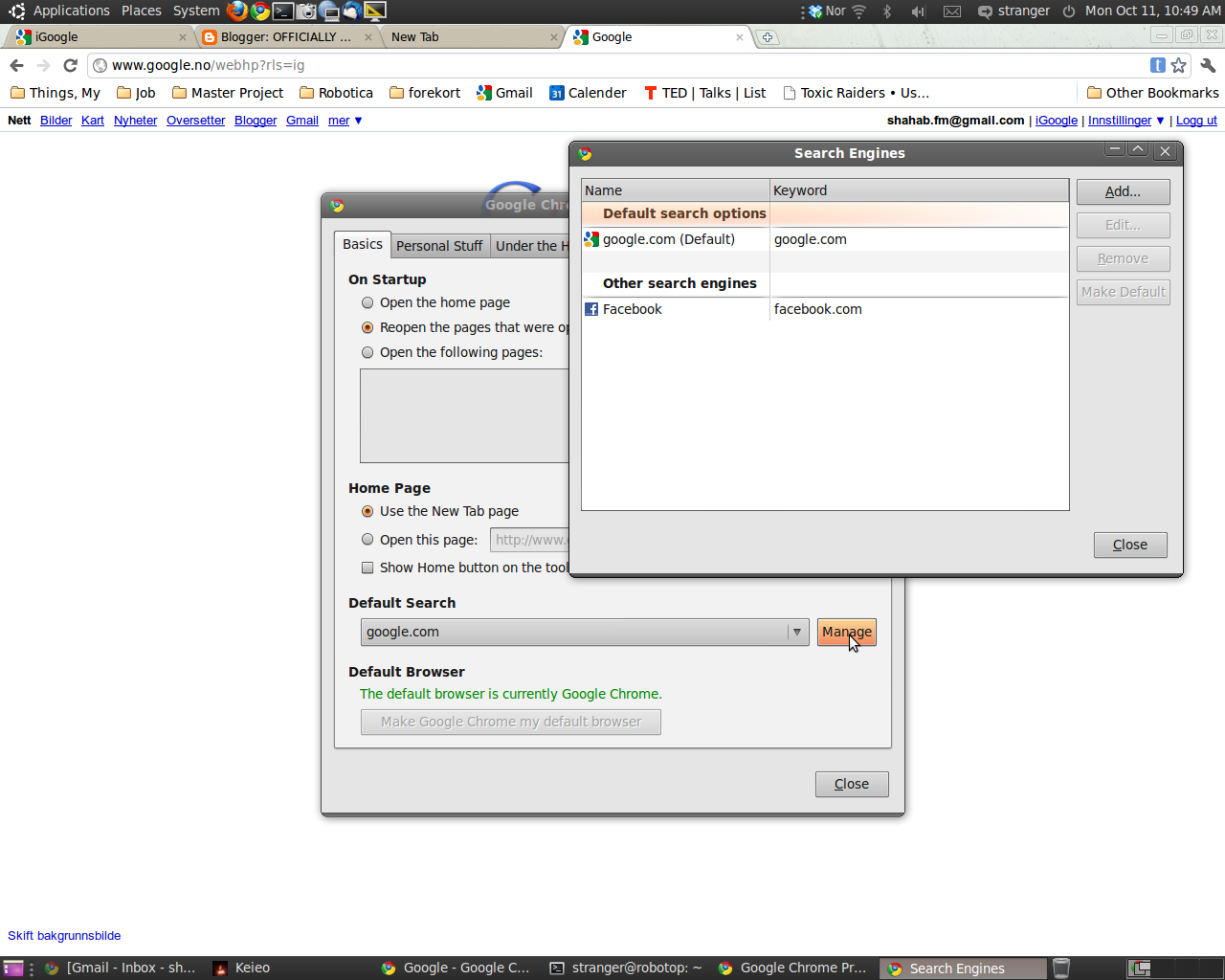
Can't search through google chrome address bar
If this happens to you, then probably your default search engine is NOT chosen. So all you need to do to click on Setting, Preferences, and then Basic, Default search.


The value of default search should be set as Google(or any other search engine you like).
Sunday, June 06, 2010
Chrome 5.0 ready for Linux
My tips about browsers for Linux, is Google Chrome. I love Firefox myself, but Chrome for Linux is perfect. While Firefox is pretty slow under Linux, Chrome is a fast reliable tools for your everyday surfing. This doesn't mean that you should throw away Firefox though, because Chrome still has its downsides. When it comes to running certificated Java applications on Internet banks still Chrome is not working properly :-(, but in everyother place, it works just perfect ...
Latest News : Chrome 5.0 is ready for Linux :
Source : About.com
The web browser Chrome, developed by Google, has finally been released as an official stable release for Linux. Google Chrome 5.0 for Linux is described by the developers as solid, high performance, and fully-featured.
Highlights of the latest version include HTML 5 functionality, such as geolocation programming interfaces, application caching, and drag-and-drop capability. Using Google accounts, you can now copy browser preferences to other machines, so you don't have to manually customize your Chrome browser on every computer you are using.
How is Chrome different from other browsers? The first item would be speed. Like the Google search engine, Chrome has been designed for speed. This shows for example in the start-up time, which is several times shorter than that of Firefox.
Another interesting feature is the "incognito" mode, which allows you to surf the Internet without the browser tracking where you are going or what you are doing. That is, it won't save your browsing history.
Chrome tries to integrate the Internet with your PC by making it easy to add short-cuts to web sites to your desktop. Not surprisingly, web search is tightly integrated as well, so that you can alternatively enter a URL or a search phrase in the address field on the "Omnibar".
However you are not limited to using Google as search engine. By typing another common search tool, such as Yahoo or Live Search in front of your search phrase you are engaging that web service instead.
Another one of Chrome's novel features is "tab isolation". This means, if the web page in one particular tab causes trouble or crashes, it does not affect the other tabs. Furthermore, you can monitor CPU and memory usage of each tab and kill it if its requirements get out of hand. You can access the Chrome task manager through the "page" menu to the right of the search/address field. From there you would go to Developer and select Task manager.
Latest News : Chrome 5.0 is ready for Linux :
Source : About.com
The web browser Chrome, developed by Google, has finally been released as an official stable release for Linux. Google Chrome 5.0 for Linux is described by the developers as solid, high performance, and fully-featured.
Highlights of the latest version include HTML 5 functionality, such as geolocation programming interfaces, application caching, and drag-and-drop capability. Using Google accounts, you can now copy browser preferences to other machines, so you don't have to manually customize your Chrome browser on every computer you are using.
How is Chrome different from other browsers? The first item would be speed. Like the Google search engine, Chrome has been designed for speed. This shows for example in the start-up time, which is several times shorter than that of Firefox.
Another interesting feature is the "incognito" mode, which allows you to surf the Internet without the browser tracking where you are going or what you are doing. That is, it won't save your browsing history.
Chrome tries to integrate the Internet with your PC by making it easy to add short-cuts to web sites to your desktop. Not surprisingly, web search is tightly integrated as well, so that you can alternatively enter a URL or a search phrase in the address field on the "Omnibar".
However you are not limited to using Google as search engine. By typing another common search tool, such as Yahoo or Live Search in front of your search phrase you are engaging that web service instead.
Another one of Chrome's novel features is "tab isolation". This means, if the web page in one particular tab causes trouble or crashes, it does not affect the other tabs. Furthermore, you can monitor CPU and memory usage of each tab and kill it if its requirements get out of hand. You can access the Chrome task manager through the "page" menu to the right of the search/address field. From there you would go to Developer and select Task manager.
Friday, July 10, 2009
Intel collaborated with Google on Chrome OS
Chip giant Intel told TG Daily today that it was in cahoots with Google on the Chrome OS project.
A representative confirmed this to us this morning.
He said: "We have been privy to the project for some time and we have worked with Google on a variety of projects, including this one. We welcome Google's move here."
The statement is likely to throw Microsoft into total panic. Intel and Microsoft were always "friends", but some have speculated they've always been enemies.

Intel put its weight behind a light weight operating system for netbooks, based on a Linux kernel, and called Moblin. Some had speculated that the Google move would throw Intel, as well as Microsoft, into disarray.
It seems not.
Now Intel has put its cards on the table, and it must be up to Microsoft to respond to the direct challenge.
Microsoft was unavailable for comment at press time. And could not be contacted for comment.
source
A representative confirmed this to us this morning.
He said: "We have been privy to the project for some time and we have worked with Google on a variety of projects, including this one. We welcome Google's move here."
The statement is likely to throw Microsoft into total panic. Intel and Microsoft were always "friends", but some have speculated they've always been enemies.
Intel put its weight behind a light weight operating system for netbooks, based on a Linux kernel, and called Moblin. Some had speculated that the Google move would throw Intel, as well as Microsoft, into disarray.
It seems not.
Now Intel has put its cards on the table, and it must be up to Microsoft to respond to the direct challenge.
Microsoft was unavailable for comment at press time. And could not be contacted for comment.
source
Thursday, July 09, 2009
Google Apps is out of beta (yes, really)
We're often asked why so many Google applications seem to be perpetually in beta. For example, Gmail has worn the beta tag more than five years. We realize this situation puzzles some people, particularly those who subscribe to the traditional definition of "beta" software as not being yet ready for prime time.
Ever since we launched the Google Apps suite for businesses two years ago, it's had a service level agreement, 24/7 support, and has met or exceeded all the other standards of non-beta software. More than 1.75 million companies around the world run their business on Google Apps, including Google. We've come to appreciate that the beta tag just doesn't fit for large enterprises that aren't keen to run their business on software that sounds like it's still in the trial phase. So we've focused our efforts on reaching our high bar for taking products out of beta, and all the applications in the Apps suite have now met that mark.
Gmail, Google Calendar, Google Docs and Google Talk — both enterprise and consumer versions — are now out of beta. "Beta" will be removed from the product logos today, but we'll continue to innovate and improve upon the applications whether or not there's a small "beta" beneath the logo. Indeed, today we're also announcing some other Google Apps features that we think will appeal to large enterprises: mail delegation, mail retention and ongoing enhancements to Apps reliability.
We have much more in store, and IT managers can read more about how to make the switch to Apps in our Microsoft Exchange and Lotus Notes resource centers. One more thing — for those who still like the look of "beta", we've made it easy to re-enable the beta label for Gmail from the Labs tab under Settings.

Ever since we launched the Google Apps suite for businesses two years ago, it's had a service level agreement, 24/7 support, and has met or exceeded all the other standards of non-beta software. More than 1.75 million companies around the world run their business on Google Apps, including Google. We've come to appreciate that the beta tag just doesn't fit for large enterprises that aren't keen to run their business on software that sounds like it's still in the trial phase. So we've focused our efforts on reaching our high bar for taking products out of beta, and all the applications in the Apps suite have now met that mark.
Gmail, Google Calendar, Google Docs and Google Talk — both enterprise and consumer versions — are now out of beta. "Beta" will be removed from the product logos today, but we'll continue to innovate and improve upon the applications whether or not there's a small "beta" beneath the logo. Indeed, today we're also announcing some other Google Apps features that we think will appeal to large enterprises: mail delegation, mail retention and ongoing enhancements to Apps reliability.
We have much more in store, and IT managers can read more about how to make the switch to Apps in our Microsoft Exchange and Lotus Notes resource centers. One more thing — for those who still like the look of "beta", we've made it easy to re-enable the beta label for Gmail from the Labs tab under Settings.

Google: Chrome OS will be free, with major PC vendors on board
In a follow-up post this afternoon, Google confirmed that its upcoming Chrome OS will be available free of charge. The company also listed some of the partners it has lined up to work with the new operating system -- including some well-known PC vendors.
The details further illustrate the potential for the new Google operating system to alter the competitive landscape for Microsoft Windows. Google said Acer, Adobe, ASUS, Freescale, Hewlett-Packard, Lenovo, Qualcomm, and Texas Instruments are among the early partners.
Google had previously hinted that Chrome OS would be available for free, and even before the confirmation this afternoon, that's what analysts were assuming. The idea isn't to make money off the operating system, but rather to help Google improve the Internet experience and deliver targeted ads, said analyst Mark Mahaney, a director at Citi Investment Research, in a note to clients earlier today:
"We neither expect the Chrome OS to generate material revenue near-term, nor do we expect Google's Chrome OS investments to materially impact its current cost structure. We wouldn't be surprised if Google gave the Chrome OS to OEMs for free, as they currently do with Android and their mobile partners. To be successful in selling an OS to full-powered PCs, Google would potentially need many large OEM partners, as well as a robust after-market support and services network, which would take significant manpower, $'s and possibly years to build out, in our opinion. This doesn't seem like Google's playbook."
Microsoft isn't commenting on the Google announcement. Google says Chrome OS will initially be targeted at netbooks when it debuts next year, but there's nothing to stop it from spreading to all sorts of computers. At the very least, the introduction of a high-profile, alternative operating system promises to give new Windows president Steven Sinofsky a major new competitor to wrestle with.
Subscribe to:
Comments (Atom)