// this line returns an array of file names
string[] fileEntries = Directory.GetFiles("c:/test");
List

double[] ar = {1.2, 3.0, 0.8};
int sum = 0;
for (double d : ar) {  // d gets successively each value in ar.
    sum += d;
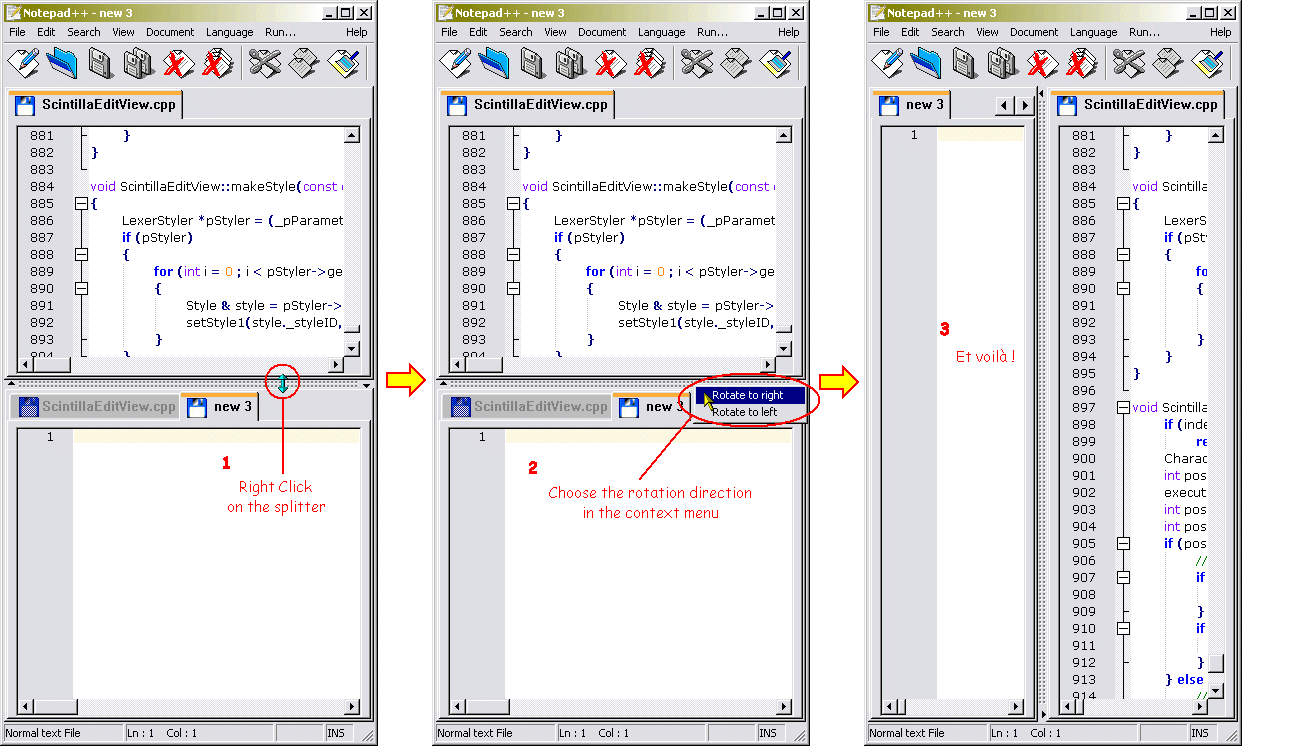
}To split the screen in Notepad++ you have to right-click on the tab
with the current document and select "Clone to another view". The
screenshot at the following page explains how to switch between
horizontally and vertically split screens.
http://notepad-plus.sourceforge.net/commun/screenshots/scrsh_rotate.gif
This page explains how Notepad++ can be integrated with Stata similar
to the built-in Do-File Editor:
http://huebler.info/2008/20080427-stata.html
thanks to Friedrich
#include

int main()
{
 char c;
 printf("Write: ");
 scanf("%c", &c);
 if(c == 0x0C) printf("ctrl+L was entered\n");
 return 1;
}
#include

int main()
{
 char c;
 printf("Write: ");
 scanf("%c", &c);
 if(c == 0x04) printf("ctrl+D was entered\n");
 return 1;
}
Character Name | Char | Code | Decimal | Binary | Hex |
Null | NUL | Ctrl @ | 0 | 00000000 | 00 |
Start of Heading | SOH | Ctrl A | 1 | 00000001 | 01 |
Start of Text | STX | Ctrl B | 2 | 00000010 | 02 |
End of Text | ETX | Ctrl C | 3 | 00000011 | 03 |
End of Transmit | EOT | Ctrl D | 4 | 00000100 | 04 |
Enquiry | ENQ | Ctrl E | 5 | 00000101 | 05 |
Acknowledge | ACK | Ctrl F | 6 | 00000110 | 06 |
Bell | BEL | Ctrl G | 7 | 00000111 | 07 |
Back Space | BS | Ctrl H | 8 | 00001000 | 08 |
Horizontal Tab | TAB | Ctrl I | 9 | 00001001 | 09 |
Line Feed | LF | Ctrl J | 10 | 00001010 | 0A |
Vertical Tab | VT | Ctrl K | 11 | 00001011 | 0B |
Form Feed | FF | Ctrl L | 12 | 00001100 | 0C |
Carriage Return | CR | Ctrl M | 13 | 00001101 | 0D |
Shift Out | SO | Ctrl N | 14 | 00001110 | 0E |
Shift In | SI | Ctrl O | 15 | 00001111 | 0F |
Data Line Escape | DLE | Ctrl P | 16 | 00010000 | 10 |
Device Control 1 | DC1 | Ctrl Q | 17 | 00010001 | 11 |
Device Control 2 | DC2 | Ctrl R | 18 | 00010010 | 12 |
Device Control 3 | DC3 | Ctrl S | 19 | 00010011 | 13 |
Device Control 4 | DC4 | Ctrl T | 20 | 00010100 | 14 |
Negative Acknowledge | NAK | Ctrl U | 21 | 00010101 | 15 |
Synchronous Idle | SYN | Ctrl V | 22 | 00010110 | 16 |
End of Transmit Block | ETB | Ctrl W | 23 | 00010111 | 17 |
Cancel | CAN | Ctrl X | 24 | 00011000 | 18 |
End of Medium | EM | Ctrl Y | 25 | 00011001 | 19 |
Substitute | SUB | Ctrl Z | 26 | 00011010 | 1A |
Escape | ESC | Ctrl [ | 27 | 00011011 | 1B |
File Separator | FS | Ctrl \ | 28 | 00011100 | 1C |
Group Separator | GS | Ctrl ] | 29 | 00011101 | 1D |
Record Separator | RS | Ctrl ^ | 30 | 00011110 | 1E |
Unit Separator | US | Ctrl _ | 31 | 00011111 | 1F |
Space | 32 | 00100000 | 20 | ||
Exclamation Point | ! | Shift 1 | 33 | 00100001 | 21 |
Double Quote | " | Shift ‘ | 34 | 00100010 | 22 |
Pound/Number Sign | # | Shift 3 | 35 | 00100011 | 23 |
Dollar Sign | $ | Shift 4 | 36 | 00100100 | 24 |
Percent Sign | % | Shift 5 | 37 | 00100101 | 25 |
Ampersand | & | Shift 7 | 38 | 00100110 | 26 |
Single Quote | ‘ | ‘ | 39 | 00100111 | 27 |
Left Parenthesis | ( | Shift 9 | 40 | 00101000 | 28 |
Right Parenthesis | ) | Shift 0 | 41 | 00101001 | 29 |
Asterisk | * | Shift 8 | 42 | 00101010 | 2A |
Plus Sign | + | Shift = | 43 | 00101011 | 2B |
Comma | , | , | 44 | 00101100 | 2C |
Hyphen / Minus Sign | - | - | 45 | 00101101 | 2D |
Period | . | . | 46 | 00101110 | 2E |
Forward Slash | / | / | 47 | 00101111 | 2F |
Zero Digit | 0 | 0 | 48 | 00110000 | 30 |
One Digit | 1 | 1 | 49 | 00110001 | 31 |
Two Digit | 2 | 2 | 50 | 00110010 | 32 |
Three Digit | 3 | 3 | 51 | 00110011 | 33 |
Four Digit | 4 | 4 | 52 | 00110100 | 34 |
Five Digit | 5 | 5 | 53 | 00110101 | 35 |
Six Digit | 6 | 6 | 54 | 00110110 | 36 |
Seven Digit | 7 | 7 | 55 | 00110111 | 37 |
Eight Digit | 8 | 8 | 56 | 00111000 | 38 |
Nine Digit | 9 | 9 | 57 | 00111001 | 39 |
Colon | : | Shift ; | 58 | 00111010 | 3A |
Semicolon | ; | ; | 59 | 00111011 | 3B |
Less-Than Sign | < | Shift , | 60 | 00111100 | 3C |
Equals Sign | = | = | 61 | 00111101 | 3D |
Greater-Than Sign | > | Shift . | 62 | 00111110 | 3E |
Question Mark | ? | Shift / | 63 | 00111111 | 3F |
At Sign | @ | Shift 2 | 64 | 01000000 | 40 |
Capital A | A | Shift A | 65 | 01000001 | 41 |
Capital B | B | Shift B | 66 | 01000010 | 42 |
Capital C | C | Shift C | 67 | 01000011 | 43 |
Capital D | D | Shift D | 68 | 01000100 | 44 |
Capital E | E | Shift E | 69 | 01000101 | 45 |
Capital F | F | Shift F | 70 | 01000110 | 46 |
Capital G | G | Shift G | 71 | 01000111 | 47 |
Capital H | H | Shift H | 72 | 01001000 | 48 |
Capital I | I | Shift I | 73 | 01001001 | 49 |
Capital J | J | Shift J | 74 | 01001010 | 4A |
Capital K | K | Shift K | 75 | 01001011 | 4B |
Capital L | L | Shift L | 76 | 01001100 | 4C |
Capital M | M | Shift M | 77 | 01001101 | 4D |
Capital N | N | Shift N | 78 | 01001110 | 4E |
Capital O | O | Shift O | 79 | 01001111 | 4F |
Capital P | P | Shift P | 80 | 01010000 | 50 |
Capital Q | Q | Shift Q | 81 | 01010001 | 51 |
Capital R | R | Shift R | 82 | 01010010 | 52 |
Capital S | S | Shift S | 83 | 01010011 | 53 |
Capital T | T | Shift T | 84 | 01010100 | 54 |
Capital U | U | Shift U | 85 | 01010101 | 55 |
Capital V | V | Shift V | 86 | 01010110 | 56 |
Capital W | W | Shift W | 87 | 01010111 | 57 |
Capital X | X | Shift X | 88 | 01011000 | 58 |
Capital Y | Y | Shift Y | 89 | 01011001 | 59 |
Capital Z | Z | Shift Z | 90 | 01011010 | 5A |
Left Bracket | [ | [ | 91 | 01011011 | 5B |
Backward Slash | \ | \ | 92 | 01011100 | 5C |
Right Bracket | ] | ] | 93 | 01011101 | 5D |
Caret | ^ | Shift 6 | 94 | 01011110 | 5E |
Underscore | _ | Shift - | 95 | 01011111 | 5F |
Back Quote | ` | ` | 96 | 01100000 | 60 |
Lower-case A | a | A | 97 | 01100001 | 61 |
Lower-case B | b | B | 98 | 01100010 | 62 |
Lower-case C | c | C | 99 | 01100011 | 63 |
Lower-case D | d | D | 100 | 01100100 | 64 |
Lower-case E | e | E | 101 | 01100101 | 65 |
Lower-case F | f | F | 102 | 01100110 | 66 |
Lower-case G | g | G | 103 | 01100111 | 67 |
Lower-case H | h | H | 104 | 01101000 | 68 |
Lower-case I | I | I | 105 | 01101001 | 69 |
Lower-case J | j | J | 106 | 01101010 | 6A |
Lower-case K | k | K | 107 | 01101011 | 6B |
Lower-case L | l | L | 108 | 01101100 | 6C |
Lower-case M | m | M | 109 | 01101101 | 6D |
Lower-case N | n | N | 110 | 01101110 | 6E |
Lower-case O | o | O | 111 | 01101111 | 6F |
Lower-case P | p | P | 112 | 01110000 | 70 |
Lower-case Q | q | Q | 113 | 01110001 | 71 |
Lower-case R | r | R | 114 | 01110010 | 72 |
Lower-case S | s | S | 115 | 01110011 | 73 |
Lower-case T | t | T | 116 | 01110100 | 74 |
Lower-case U | u | U | 117 | 01110101 | 75 |
Lower-case V | v | V | 118 | 01110110 | 76 |
Lower-case W | w | W | 119 | 01110111 | 77 |
Lower-case X | x | X | 120 | 01111000 | 78 |
Lower-case Y | y | Y | 121 | 01111001 | 79 |
Lower-case Z | z | Z | 122 | 01111010 | 7A |
Left Brace | { | Shift [ | 123 | 01111011 | 7B |
Vertical Bar | | | Shift \ | 124 | 01111100 | 7C |
Right Brace | } | Shift ] | 125 | 01111101 | 7D |
Tilde | ~ | Shift ` | 126 | 01111110 | 7E |
Delta | D | 127 | 01111111 | 7F |